


Zenarmor v1.14 features an improved and more intuitive user interface for OPNsense users. Not only does it have a brand-new user interface, but also a brand-new backend service. Almost every line of backend code is written from afresh, and all sensei system paths are replaced with zenarmor.
Zenarmor v1.14 is a significant upgrade. This is why we’ve prepared this guide to help you navigate this upgrade smoothly.
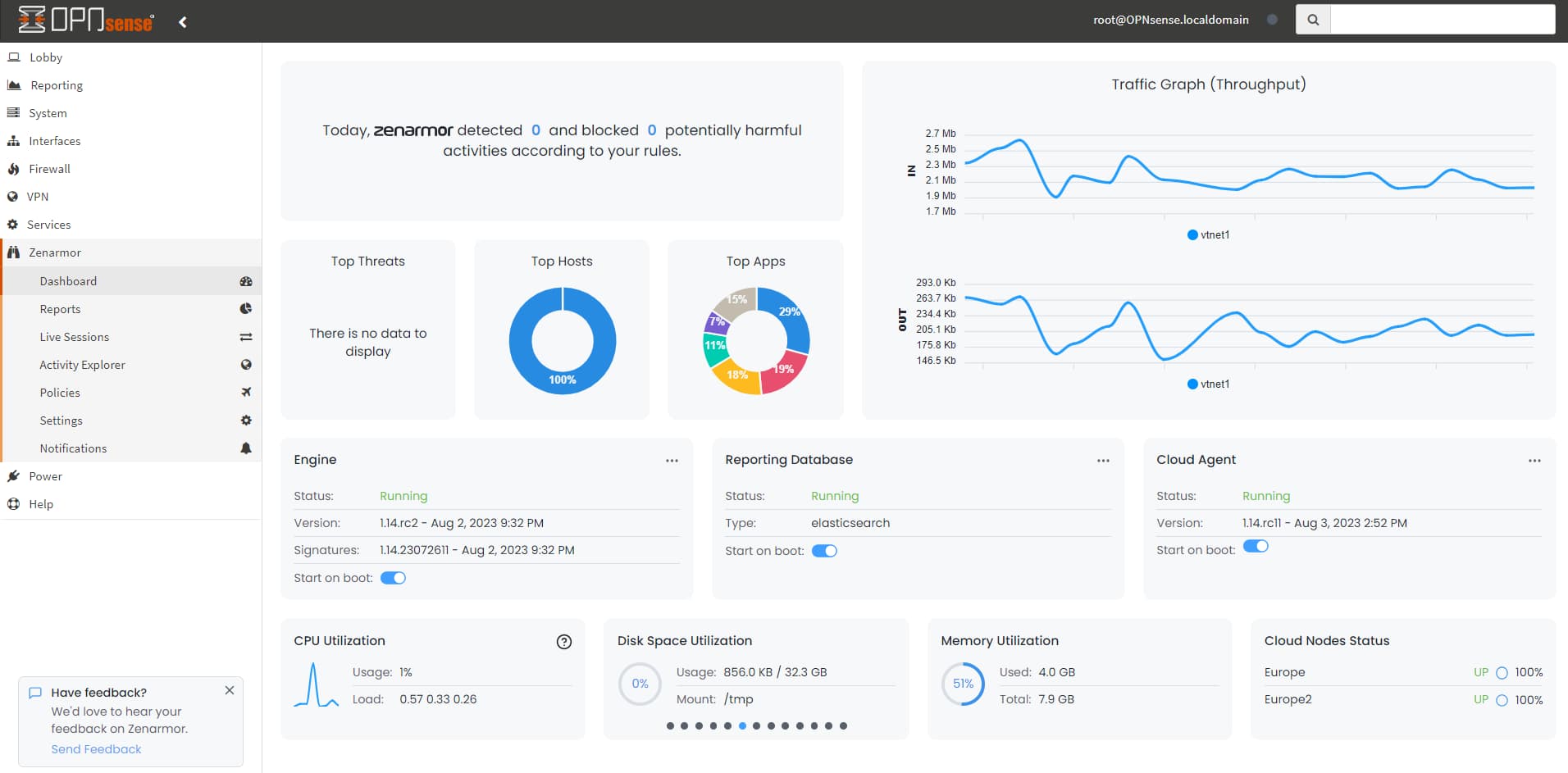
Figure 1: Zenarmor 1.14 Dashboard on OPNsense
Even though it has been rigorously tested by the Zenarmor team and upgrading to Zenarmor is a simple procedure that allows you to upgrade your system without incident, it is best to be prepared for Murphy. It is crucial to proceed with caution to avoid disruptions and data loss.
Sometimes unfortunate events occur when we least expect them or are least prepared for them. With each software update, there is a small chance of data loss. Software upgrades can be difficult, time-consuming, and hazardous if not performed correctly. Occasionally, significant feature changes necessitate the reorganization of data during the revision procedure. Upgrade flaws, process interruptions, and unique use cases can all lead to software update corruption. Worse still, entire sections of the software may become corrupted. In uncommon but not unheard-of instances, the entire installation may become corrupt.
In this post, we will give you a hand in upgrading your Zenarmor NGFW smoothly.
What are the Tips for Zenarmor Upgrade?
Software upgrades can be challenging, but if you follow the advice below, the process can be relatively straightforward and have minimal impact on your business. Here are the best practices that you may follow to upgrade your Zenarmor safely:
-
Create Snapshot: Before beginning the upgrade procedure, create a snapshot of your virtual machine if you are operating your firewall in a virtual environment, such as Proxmox VE. So that you can rapidly deploy and operate your firewall system by minimizing downtime in the event of a problem.
-
Backup Zenarmor: To be prepared for the worst-case scenario, backup your Zenarmor configuration and policies. If you do have to roll back with a fresh installation of Zenarmor, you may rapidly recover from the failure by restoring your next-generation firewall.
-
Note License Key: If you need a fresh installation of Zenarmor, you may be required to activate your subscription key. For expedited subscription activation, note your Zenarmor license key in a safe place. Navigate to Zenarmor > Configuration > About > View Subscription to access the license key. Additionally, you can view your license key through your Zenconsole account.
-
Test in a Staging Environment: Whenever possible, test the upgrade in a staging or test environment that closely mimics your production setup. This allows you to identify and resolve any compatibility or performance issues before deploying the upgrade in the production environment.
-
Ensure Your Connection is Reliable: Ensure that you have a secure and reliable network connection to download the firmware update.
-
Schedule Appropriate Time: To reduce service interruption and cybersecurity risks, schedule an appropriate time for your business. Establish a maintenance window that does not interfere with prime operation hours or periods of heavy network traffic. Weekend or nighttime hours are typically optimal for significant system upgrade operations. Do not enhance your system during office hours; instead, conduct a thorough analysis to determine when an upgrade or prospective rollback will have the least impact on your business.
-
Get Approval: It is essential to understand who has the authority to make upgrade decisions and who makes the final “Go” or “No-Go” determination. Share your plan for an upgrade with your manager or approval committee and obtain their approval. Maintain an open line of communication with your manager regarding why you’re upgrading, what you’re upgrading, and when. Open channels of communication contribute significantly to the success of an upgrade: between departments impacted by the upgrade, between front-line staff and decision-making management, and, if necessary, between your organization and external partners and visitors.
-
Prefer Zenarmor UI: It may be better to use Zenarmor > Status page to update your Zenarmor in a more controlled and safe way.
-
Fresh Install and Restore Backup: If you are unable to upgrade Zenarmor NGFW and cannot resolve the issue, you can attempt a fresh installation and restore from your most recent backup.
-
Test: Create a test scenario and verify that everything is functioning as anticipated. If a problematic update must be reinstalled, testing will save you a tremendous amount of time and effort. You must examine the firewall’s functionality, efficacy, stability, and compatibility. Check the Zenarmor notification page. Notifications enable you to be notified of critical Zenarmor firewall events. If you encounter any problems or errors, you must promptly identify and correct them, or revert to the previous state if necessary.
-
Document and Review: It is essential to document the entire process of the upgrade. You must document the update’s specifics and procedures, including the date, time, source, version, and modifications made. You must also document any problems or errors that arose, as well as how they were resolved or avoided. You must assess the efficacy, efficiency, and customer contentment of the update or revision, as well as review the process and the outcomes. In addition to sharing your findings and lessons learned with your stakeholders, you must also provide feedback and recommendations for future updates or enhancements. This information should be recorded in a readily accessible location so that you can enhance your process next time.
-
Contact Zenarmor Team: Never forget that Zenarmor is always by your side. You can communicate with them at any time. If you are experiencing issues with your next-generation firewall, do not hesitate to contact the support team.